
Running a successful call center or help desk requires getting the right number of agents in place at precisely the right times. Schedule too many call center agents needlessly drives up costs and staffing too few agents at peak times causes your service to suffer. Snap Schedule call center scheduling software helps you schedule call center agents when they are needed while complying with their availability, work hour limits, and labor cost constraints.
Most call centers have a variety of staff positions with various skills to schedule and shifts to cover. Businesses that have peak hours and high seasons allocate employees proportionally by the hour of the day and/or rotate employees to ensure an even spread of shifts for each employee. Union and FLSA rules may place restrictions on work hours, overtime compensation, and the types of work schedules that can be implemented.
Using spreadsheets, documents, online calendars, or paper to schedule staff and support personnel may be familiar. Perhaps it’s the way your organization has always done call center agent scheduling. While these methods may be sliding by, they lack the capabilities and features needed to increase efficiency, reduce labor costs, and promote employee work-life balance.
See How Snap Schedule Works
-
Provide better service
Produce optimized staffing schedules for improved service levels with the right number of call center staff on each shift. Overhead costs are reduced, and managers are freed up to spend valuable time with staff for training and other tasks.
-
Be covered
Get a view of your organization’s staffing coverage by skill, unit, department, location, etc. Visual indicators instantly alert which areas are over or under-staffed. Shift Coverage Planner can help ensure the coverage you need for each department or location, position, and skill.
-
Reduce labor costs & overtime
Snap Schedule call center scheduling software automatically sums up employees’ work hours, calculates overtime, on-call, time off, and shift premium pays, and provides detailed labor cost reports so you know instantly if you are on budget.
-
Schedule tasks & breaks
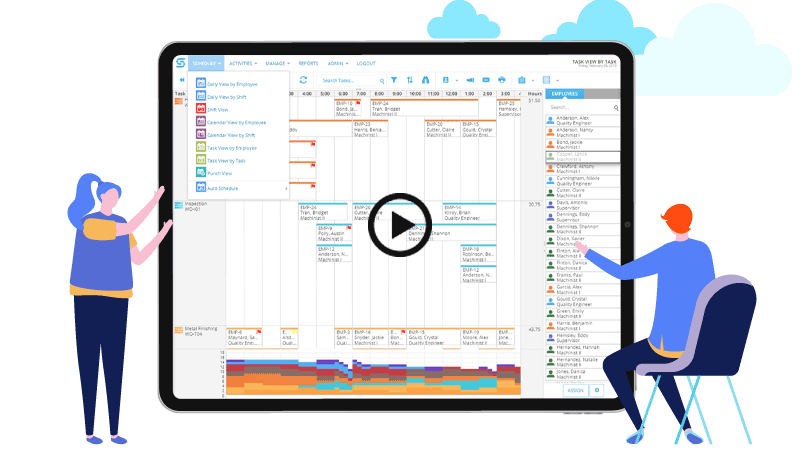
The Task view shows what agents will be doing in each shift or interval and can include activities like handling calls, emails, breaks, training sessions, coaching sessions, and so on. Line up breaks and lunches to ensure that maximum overlap exists for the best coverage.
-
Easily publish schedules
Publish work schedules, calendars, and reports in PDF and a variety of other formats. Automatically email work schedules (in text or iCalendar file format) to agents and/or their supervisors.
-
Employee self-service
Let agents set availability, pick up, bid on, and swap shifts with other agents. Build employee job satisfaction and give agents more control over their work schedules. This goes a long way toward improving employee job satisfaction and reducing attrition.
Request a Personalized Demo & Consultation
If you prefer personalized online demo from the convenience of your office via Citrix GoToMeeting, we can do that too. We will schedule one of our product specialists to help you set up your schedule, walk you through the many features of our scheduling software, and answer your specific questions. There is no risk, no cost, and absolutely no obligation on your part.
Request a DemoTry It For Yourself
Try Snap Schedule 365 absolutely free for a full 30 days. The trial period starts on the day you first use our software and automatically expires 30 days after. You can use one of the sample schedules to evaluate the software features or enter real data and use Snap Schedule 365 to schedule and manage your employees.
Get Your Free TrialQUESTIONS? OUR REPS HAVE ANSWERS. 1-800-450-4230
We are proud to serve some of the world's biggest brands

















Client Testimonials
I came across Snap Schedule online and within 2 hours I had built out my entire schedule. I was able to pick it up quickly because of how intuitive the program is.
We love the employee access portal, and love all the reporting we can do. On a corporate level we can view what our needs are easily, and can manage time-off more simply.
We looked at a lot of different scheduling software. All of it just seemed so convoluted and complicated. The simplicity of Snap Schedule was a big selling point for us.